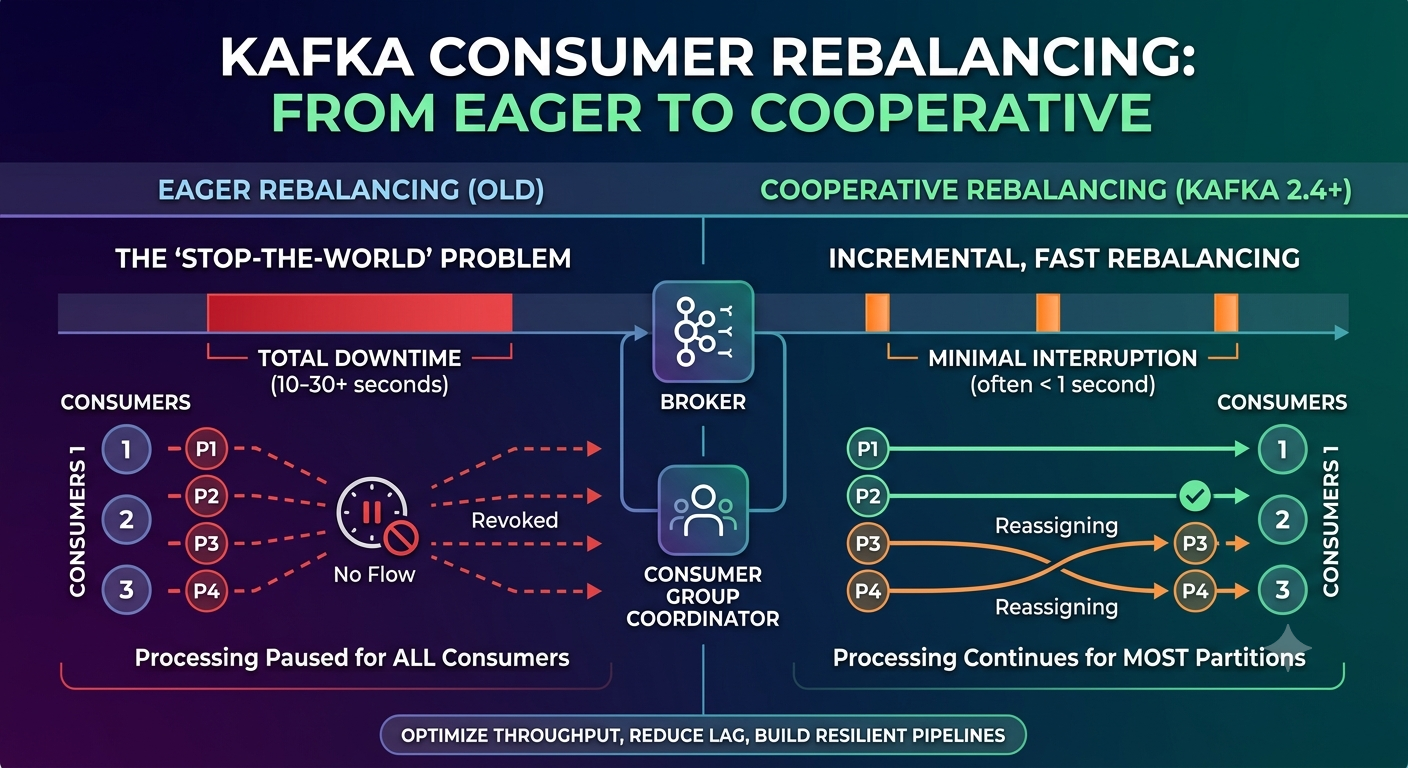
Kafka Consumer Rebalancing: From Eager to Cooperative – Heart of Stream Processing
Kafka Consumer Rebalancing: From Eager to Cooperative – Heart of Stream Processing
Short description:
Consumer rebalancing is the most misunderstood and underestimated component of Apache Kafka. A single misconfigured timeout can bring a streaming pipeline to its knees. This post dissects the rebalancing protocol – from the eager, stop‑the‑world days to today’s incremental, cooperative approach. You’ll learn what happens inside the consumer group coordinator, why rebalance storms occur, and how to tune for resilience. Written for engineers who run Kafka in production.
1. Why Rebalancing Matters More Than You Think
Most Kafka users know that adding or removing a consumer triggers a rebalance. Few understand what happens during that rebalance – and how it can silently destroy throughput for minutes at a time.
A rebalance is the process of reassigning topic partitions among the consumers in a group. It is necessary for scalability and fault tolerance. But it is also a global stop‑the‑world event for the consumer group: while rebalancing, no consumer can poll new data.
In large groups or with slow‑processing consumers, a single rebalance can cause:
Processing pauses of 30 seconds to several minutes
Message processing lag spikes
Zombie consumers that never recover
End‑to‑end latency violations
Understanding rebalancing is the difference between “Kafka is slow” and “I know exactly why.”
2. The Players: Consumer Group Coordinator & Group State
Every Kafka cluster has a group coordinator – one of the brokers elected for each consumer group (based on the group name’s hash). The coordinator manages group membership and partition assignment.
Consumer group states (as seen in kafka-consumer-groups --describe):
State | Meaning | Can process messages? |
|---|---|---|
| No active consumers | No |
| Group is rebalancing; consumers are joining | No |
| Assignment is being distributed to members | No |
| Normal operation; each consumer has partitions | Yes |
| Group has been removed | No |
The transition Stable → PreparingRebalance → (assignment) → Stable is a rebalance.
3. The Classic (Eager) Rebalancing Protocol
Before Kafka 2.4, all rebalances were eager. The protocol:
Consumer sends
LeaveGroup(or heartbeat timeout triggers removal).Coordinator broadcasts
JoinGrouprequest to all members.All consumers revoke all partitions (stop processing immediately).
One consumer becomes the group leader and computes a new assignment.
The leader sends
SyncGroupwith the assignment.Coordinator distributes assignment to all members via
SyncGroupresponses.Consumers resume processing from their new partitions.
Critical downside: During steps 2–6, every consumer is paused. For a group of 100 consumers, a rebalance can take 10–30 seconds – and during that time, zero messages are processed. Lag skyrockets.
4. The Problem of Stuck Consumers and Session Timeouts
How does the coordinator know a consumer is dead? Two timeouts:
session.timeout.ms(default 45s) – maximum time without a heartbeat before the consumer is declared dead.heartbeat.interval.ms(default 3s) – frequency of heartbeats. Must be < 1/3 of session timeout.
But here’s the trap: Heartbeats are sent by a background thread, not the processing thread. A consumer can be stuck processing a single message for 10 minutes (e.g., a slow database query) – heartbeats continue, so the coordinator never evicts it. The consumer appears alive but makes no progress.
This is why max.poll.interval.ms exists (default 5 minutes). If the consumer does not call poll() within this interval, the coordinator forces a rebalance – even if heartbeats are fine. The offending consumer is removed, and partitions are reassigned.
But the default 5 minutes is often too high. If your processing takes 6 minutes per batch, you trigger a rebalance every time. And that rebalance will revoke all partitions, then reassign them – potentially to the same consumer, causing a loop.
5. Rebalance Storm: When One Bad Consumer Takes Down the Group
A rebalance storm is a cascade of repeated rebalances, often triggered by a consumer that cannot finish processing within max.poll.interval.ms.
Typical timeline:
Time 0: Consumer A starts processing a huge batch
T+4 min: Consumer A still processing, hasn't called poll()
T+5 min: Coordinator forces rebalance, removes consumer A
T+5.5 min: New assignment computed, partitions reassigned to others
T+6 min: Consumer A finishes processing, tries to commit – but it's no longer in the group. It rejoins.
T+6.5 min: Coordinator triggers another rebalance to include consumer A
T+7 min: Consumer A gets partitions (maybe the same ones)
Repeat every 5 minutes → infinite rebalance storm
During this storm, the group may spend 50% or more of its time rebalancing instead of processing. Lag grows unbounded.
6. Enter Cooperative Rebalancing (Kafka 2.4+)
Cooperative rebalancing (also called incremental rebalancing) changes the game. Instead of revoking all partitions immediately, it allows consumers to keep processing the partitions they will retain.
The protocol uses the CooperativeStickyAssignor:
Only partitions that need to move are revoked.
Consumers continue processing all other partitions during the rebalance.
The assignment is done in phases, with multiple JoinGroup/SyncGroup cycles if necessary.
Result: Rebalance time drops from tens of seconds to often under 1 second, and processing never fully stops.
7. The Protocol Step‑by‑Step: Eager vs. Cooperative
Let’s compare the two protocols for a simple case: 2 consumers, 4 partitions, adding a third consumer.
Eager (Old way)
Step | Action | Processing status |
|---|---|---|
1 | New consumer joins, sends JoinGroup | All consumers continue processing |
2 | Coordinator triggers rebalance → all consumers revoke ALL partitions | PAUSED – zero processing |
3 | Leader computes new assignment, sends SyncGroup | PAUSED |
4 | Assignment distributed; consumers fetch new partitions | PAUSED |
5 | Consumers start processing | Resumed |
Total downtime: 5‑15 seconds.
Cooperative (Kafka 2.4+)
Step | Action | Processing status |
|---|---|---|
1 | New consumer joins, sends JoinGroup | All consumers continue processing |
2 | Coordinator triggers rebalance | Consumers continue processing |
3 | Leader computes assignment, identifies partitions to move | Continues |
4 | Only affected consumers revoke the specific partitions they are losing | Partial pause – most partitions still process |
5 | New consumer fetches its new partitions | All but moved partitions resume |
6 | If multiple moves needed, another cycle occurs, but each is fast | Very short pauses |
Total downtime per affected partition: < 200ms. The group never fully stops.
8. Partition Assignment Strategies Compared
Kafka provides four built‑in partition.assignment.strategy implementations:
Strategy | Rebalancing type | Key characteristic | When to use |
|---|---|---|---|
| Eager | Assigns per‑topic, contiguous ranges | Default (legacy), but causes uneven distribution |
| Eager | Cycles through partitions and consumers | Even distribution, but still eager and stop‑the‑world |
| Eager | Minimizes partition movement after rebalance | Good for stateful consumers, but still pauses all |
| Cooperative | Incremental rebalancing, only moves what’s needed | Recommended for all new and existing groups |
Migration note: You can change the assignment strategy of an existing consumer group, but it will trigger a full rebalance the first time. After that, cooperative rebalancing takes effect.
9. Tuning the Timeouts for Production
Default timeout values are often too aggressive or too lenient. Here is a battle‑tested configuration for a typical low‑latency service:
Parameter | Default | Recommended (low‑latency) | Why |
|---|---|---|---|
| 45000 | 10000 (10s) | Detect dead consumers faster – rebalances start sooner |
| 3000 | 3000 | Keep 1/3 of session timeout (3s is fine for 10s session) |
| 300000 | 30000 (30s) | Force a rebalance if a single poll takes >30s – prevents hidden stalls |
| 500 | 50–100 | Smaller batches ensure processing fits within poll interval |
But caution: Lower timeouts increase the chance of unnecessary rebalances due to temporary network hiccups. Monitor your rebalance frequency after tuning.
10. Implementing a Cooperative Consumer in Java (Code)
Here is a minimal but production‑ready consumer configuration using cooperative rebalancing:
import org.apache.kafka.clients.consumer.ConsumerConfig;
import org.apache.kafka.clients.consumer.KafkaConsumer;
import org.apache.kafka.common.serialization.StringDeserializer;
import org.apache.kafka.clients.consumer.CooperativeStickyAssignor;

import java.util.Properties;
import java.util.Collections;

Properties props = new Properties();
props.put(ConsumerConfig.BOOTSTRAP_SERVERS_CONFIG, "broker1:9092,broker2:9092");
props.put(ConsumerConfig.GROUP_ID_CONFIG, "my-cooperative-group");
props.put(ConsumerConfig.KEY_DESERIALIZER_CLASS_CONFIG, StringDeserializer.class.getName());
props.put(ConsumerConfig.VALUE_DESERIALIZER_CLASS_CONFIG, StringDeserializer.class.getName());

// Cooperative rebalancing
props.put(ConsumerConfig.PARTITION_ASSIGNMENT_STRATEGY_CONFIG, CooperativeStickyAssignor.class.getName());

// Aggressive timeouts for fast failure
props.put(ConsumerConfig.SESSION_TIMEOUT_MS_CONFIG, 10000);
props.put(ConsumerConfig.HEARTBEAT_INTERVAL_MS_CONFIG, 3000);
props.put(ConsumerConfig.MAX_POLL_INTERVAL_MS_CONFIG, 30000);
props.put(ConsumerConfig.MAX_POLL_RECORDS_CONFIG, 100);
props.put(ConsumerConfig.ENABLE_AUTO_COMMIT_CONFIG, false); // Manual commit recommended

KafkaConsumer<String, String> consumer = new KafkaConsumer<>(props);
consumer.subscribe(Collections.singletonList("my-topic"));

while (true) {
    var records = consumer.poll(Duration.ofMillis(1000));
    for (var record : records) {
        // process quickly, within 30 seconds total
    }
    consumer.commitSync(); // after batch, not per record
}
Note: You must use commitSync() or commitAsync() after processing. Never commit inside the per‑record loop – it kills throughput.
11. Monitoring Rebalancing in Production
You cannot fix what you cannot see. These metrics are critical:
kafka.consumer:type=consumer-coordinator-metrics
assigned-partitions– number currently assigned to this consumerrebalance-total– total rebalance countrebalance-latency-avg– average time spent rebalancing
kafka.consumer:type=consumer-fetch-manager-metrics
records-lag-max– maximum lag across assigned partitions (if this grows during rebalances, you have a problem)
Set an alert: if rebalance-total increases by more than 5 per hour, investigate.
12. A Complete Rebalance Trace (Millisecond by Millisecond)
Let’s simulate a real failure: a consumer that hangs for 35 seconds (greater than max.poll.interval.ms=30s) in a cooperative group.
Time (ms) | Component | Event | Effect |
|---|---|---|---|
0 | Consumer C1 | Starts long processing (database query) | No poll() called |
5000 | Heartbeat thread | Sends heartbeat normally | Coordinator sees C1 as alive |
10000 | Heartbeat thread | Sends heartbeat normally | Still alive |
15000 | Heartbeat thread | Sends heartbeat normally | Alive |
20000 | Heartbeat thread | Sends heartbeat normally | Alive |
25000 | Heartbeat thread | Sends heartbeat normally | Alive |
30000 | Coordinator | max.poll.interval.ms elapsed, C1 has not polled | Coordinator marks C1 as failed |
30100 | Coordinator | Triggers rebalance (PreparingRebalance) | All consumers notified |
30150 | Cooperative assignor | Leader computes new assignment | Only C1’s partitions need moving |
30200 | Coordinator | Sends revoke request for C1’s partitions | Other consumers continue processing |
30400 | Other consumers (C2, C3) | Receive new assignment, start fetching C1’s partitions | Processing continues without pause |
35000 | Consumer C1 (original) | Finishes long query, calls poll() | Finds it is no longer in group, rejoins |
35100 | Coordinator | Adds C1 back with a new member epoch | Another rebalance? Possibly, but cooperative minimizes disruption |
Key takeaway: During the entire event, only the failing consumer’s partitions were paused for ~300ms. Other consumers never stopped. In an eager rebalance, all consumers would have been paused for >5 seconds.
13. Trade‑Offs Explicitly Made by Kafka’s Rebalancing Design
Kafka’s rebalancing makes deliberate trade‑offs. Understanding them is the mark of a senior engineer.
We prioritize | We accept |
|---|---|
Simplicity of the coordinator (no persistent state) | Rebalances require a full group handshake each time |
Scalability to thousands of consumers | Large groups take longer to rebalance (O(N) complexity) |
Fast failure detection via heartbeats | Network blips can cause false‑positive rebalances |
Cooperative rebalancing (Kafka 2.4+) | More complex protocol, requires version compatibility |
These trade‑offs are not flaws – they are engineering decisions that make Kafka work at scale.
14. Common Pitfalls & How to Avoid Them
Pitfall: Using default partition assignment strategy (
RangeAssignor) with many topics → massive assignment skew.Fix: Switch to
CooperativeStickyAssignor.Pitfall: Setting
max.poll.records=500with heavy processing → each poll exceedsmax.poll.interval.ms→ continuous rebalance storm.Fix: Lower
max.poll.recordsto 50–100, or increasemax.poll.interval.msto a safe value (but better to speed up processing).Pitfall: Calling
commitSync()inside the per‑record loop.Fix: Commit after the entire batch. Use
commitAsync()with callback for failure handling.Pitfall: Using static group membership (
group.instance.id) incorrectly → zombie consumers block rebalancing forever.Fix: Only use static membership for truly stateful, long‑lived consumers (e.g., Kafka Streams).
15. Conclusion: Rebalancing Is a Feature, Not a Bug
Consumer rebalancing is Kafka’s mechanism for elasticity and fault tolerance. When you understand it – the protocol, the timeouts, the assignment strategies – you stop fearing it and start tuning it.
The move from eager to cooperative rebalancing was one of Kafka’s most important improvements. It turned a stop‑the‑world event into a nearly invisible background operation.
If you take one thing away: always use CooperativeStickyAssignor. Monitor your rebalance frequency. Size your max.poll.records so that processing comfortably fits within max.poll.interval.ms. And never, ever ignore a rebalance storm.
This post is based on production experience with Kafka 2.8+ and the cooperative rebalancing protocol. All code examples are illustrative; always test timeouts in your own environment.